Keyloom
A free touch-typing practice website designed and built for focused daily practice.
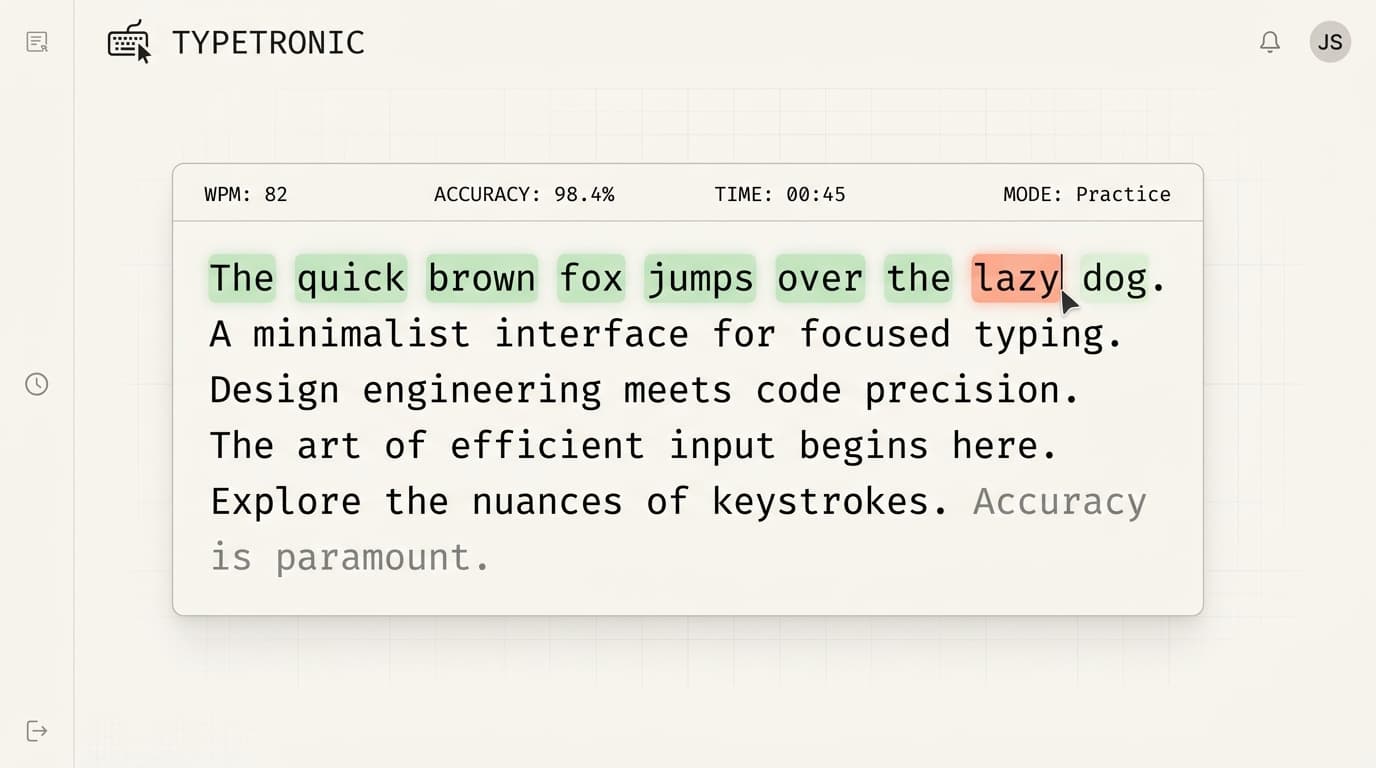
Keyloom is a typing application created to facilitate clean, minimalist, and focused daily keyboard practice, stripped of typical bloated graphics or heavy animations.
Next.js · React · JavaScript · CSS
Most typing tools are heavily gamified, cluttered with ads, and lack clean typing statistics or editorial-grade layouts.
Typists need an ultra-fast, minimalist, and distraction-free interface to practice muscle memory, where typographical errors and pacing are clearly visual.
Created an aesthetic, keyboard-first environment where typography is the primary visual element, drawing focus to active character blocks.
Created a layout utilizing ample whitespace and generous character tracking.
- ·Selected clean monospace typography to align text characters perfectly.
- ·Designed soft state colors (subtle green for correct, muted rust for errors) to prevent visual noise.
- ·Structured simplified dashboard counters keeping typist stats peripheral during execution.
Developed the application using Next.js with localized browser state handling.
- ·Optimized keyboard event listener triggers to prevent input latency.
- ·Built dynamic typing logic tracking active cursor positions, WPM, and accuracy metrics.
- ·Crafted smooth transitions between tests and results using pure CSS keyframes.
Successfully launched a highly performant static application that feels premium and responsive.
- ✓Built with minimal external dependencies, resulting in instant client-side loads.
- ✓Provided a clean, distraction-free environment highly praised by minimalist desk setup enthusiasts.
“Keyloom taught me how minor details, like the delay in input processing or the exact hue of an error underline, can drastically influence user experience and satisfaction.”